If you upgraded from Windows 10 to Windows 11, you’ve probably noticed that Microsoft changed the right-click context menu. Instead of showing all options at once, it now requires an extra click to reveal the full menu. This can be frustrating, especially when you’re used to the efficiency of the Windows 10 layout.
Fortunately, there’s a simple fix using a batch script that modifies the Windows Registry. This method has been tested on Windows 11 official release and builds 22000.65, 71, 100, 132, 160, and 194.
Steps to Change Windows 11 Right-Click Menu to Windows 10 Style
- Open Notepad.
- Copy and paste the following code into a new text file:
@echo off

:start
cls
echo,
echo 修改右键菜单模式
echo,
echo 1 穿越到Windows 10默认模式
echo,
echo 2 恢复为Windows 11默认模式
echo,
echo 0 什么也不做,退出
echo,
echo,
choice /c:120 /n /m:"请选择要进行的操作(1/2/0):"
if %errorlevel%==0 exit
if %errorlevel%==2 goto cmd2
if %errorlevel%==1 goto cmd1
exit

:cmd1
reg.exe add "HKCU\Software\Classes\CLSID\{86ca1aa0-34aa-4e8b-a509-50c905bae2a2}\InprocServer32" /f /ve
shutdown -l
exit

:cmd2
reg.exe delete "HKCU\Software\Classes\CLSID\{86ca1aa0-34aa-4e8b-a509-50c905bae2a2}" /f
shutdown -l
exit
- Click File > Save As.
- Set the filename to Windows11修改右键菜单模式.bat (or any name you like, but keep the .bat extension).
- In the Save as type dropdown, select All Files (not Text Documents).
- For Encoding, choose ANSI to avoid garbled characters.
- Save the file to your desktop or any convenient location.
- Right-click the saved .bat file and select Run as administrator.
- In the command window, press 1 to switch to Windows 10 style, or 2 to revert to Windows 11 style. The script will log you out automatically to apply the change.
After logging back in, you’ll see the classic Windows 10 right-click menu with all options visible immediately. If you ever want to revert, just run the script again and choose option 2.
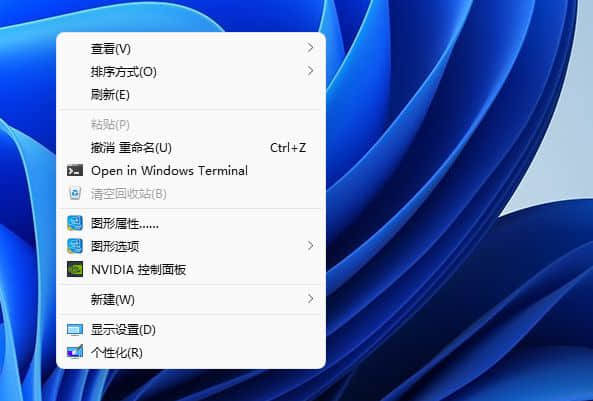
This tweak modifies the Windows Registry to restore the old context menu. It’s safe and reversible. Enjoy the familiar Windows 10 experience on Windows 11!