If an app crashes immediately after opening on your Apple M1 Mac, here’s the fix. For example, I tested “Downie” today and it crashed on launch as shown below:

Right-click the app (e.g., “Downie”) and select Get Info.
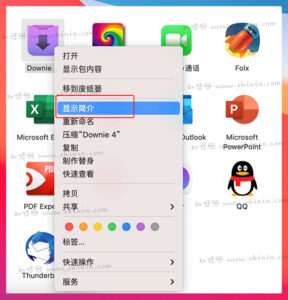
Check the box “Open using Rosetta”.

If you don’t see this option, there are two possibilities: either Rosetta 2 is not installed on your Mac, or the app is Intel-only (not Universal). Check the app’s architecture under “Kind” in Get Info — it will say “Intel” or “Universal”.
If it’s Intel-only, just install Rosetta 2 (if not already installed) and run the app directly.
Try launching the app again — it should work now!
Note: If the app still crashes after following these steps, you’ll have to wait for the developer to release an update compatible with Apple Silicon.