
What is Ventoy?
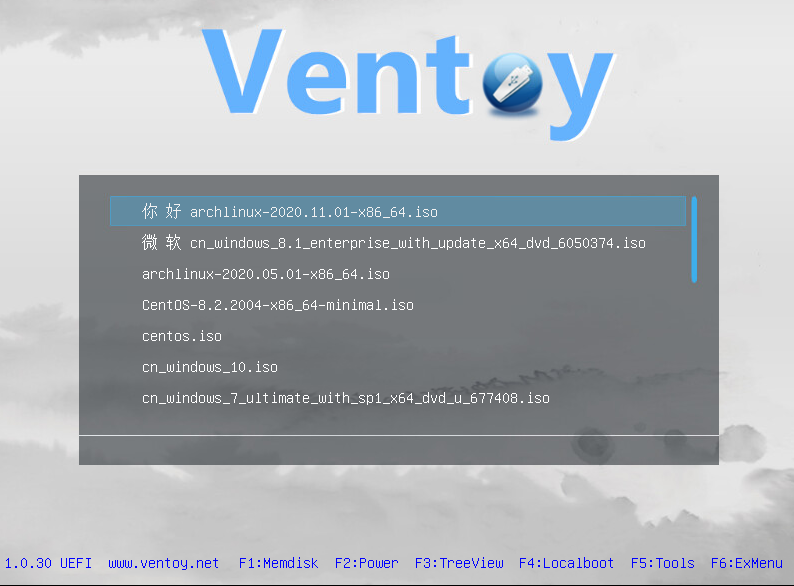
Simply put, Ventoy is an open-source tool that creates a bootable USB drive. With Ventoy, you don’t need to format your USB drive repeatedly. Just copy ISO, WIM, IMG, VHD(x), or EFI files onto it, and you can boot directly — no extra steps required. You can copy multiple different image files at once, and Ventoy will display a menu for you to choose from at startup (see screenshots). After installing Ventoy, the same USB drive supports x86 Legacy BIOS, IA32 UEFI, x86_64 UEFI, ARM64 UEFI, and MIPS64EL UEFI modes. Ventoy supports most common operating systems (Windows, WinPE, Linux, Unix, VMware, Xen, etc.). Over 720+ image files have been tested (list). It supports 90%+ of the operating systems listed on distrowatch.com (list).
Ventoy Features
- 100% open source (license)
- Easy to use (instructions)
- Fast (as fast as copying files)
- Can be installed on USB drives, local hard drives, SSDs, NVMe, SD cards, etc.
- Boot directly from ISO, WIM, IMG, VHD(x), EFI files without extraction
- ISO/WIM/IMG/VHD(x)/EFI files do not need to be contiguous on disk
- Supports MBR and GPT partition formats
- Supports x86 Legacy BIOS and IA32/x86_64/ARM64/MIPS64 UEFI
- UEFI mode supports Secure Boot (details)
- Supports data persistence (details)
- Supports automated installation deployment for Windows (details)
- Supports automated installation deployment for RHEL7/8, CentOS7/8, SUSE, Ubuntu Server, Debian, and other Linux systems (details)
- Image partition supports FAT32, exFAT, NTFS, UDF, XFS, Ext2/3/4 file systems
- Supports ISO files larger than 4GB
- Preserves original ISO boot menu style (Legacy & UEFI)
- Supports most common operating systems; tested with 720+ ISO files
- Not just booting, but a complete installation process
- Menu can switch between list mode and directory tree mode in real time (details)
- Introduces the “Ventoy Compatible” concept
- Supports plugin extensions
- Linux vDisk (vhd, vdi, raw, etc.) boot solution
- Supports injecting files into the running environment
- Dynamically replaces original boot configuration files in ISO
- Highly customizable theme styles and menus
- Supports write protection for USB drive during boot
- Does not affect normal daily use of the USB drive
- Data is not lost during version upgrades
- No need to upgrade Ventoy when operating systems are updated